From a ZIP code to a max offer.
Free shows where rentals make money. Reports check one house. Basic checks every home for sale in your markets, and Pro does it for a whole city.
See where rentals cash flow.
No credit card and no time limit.
-
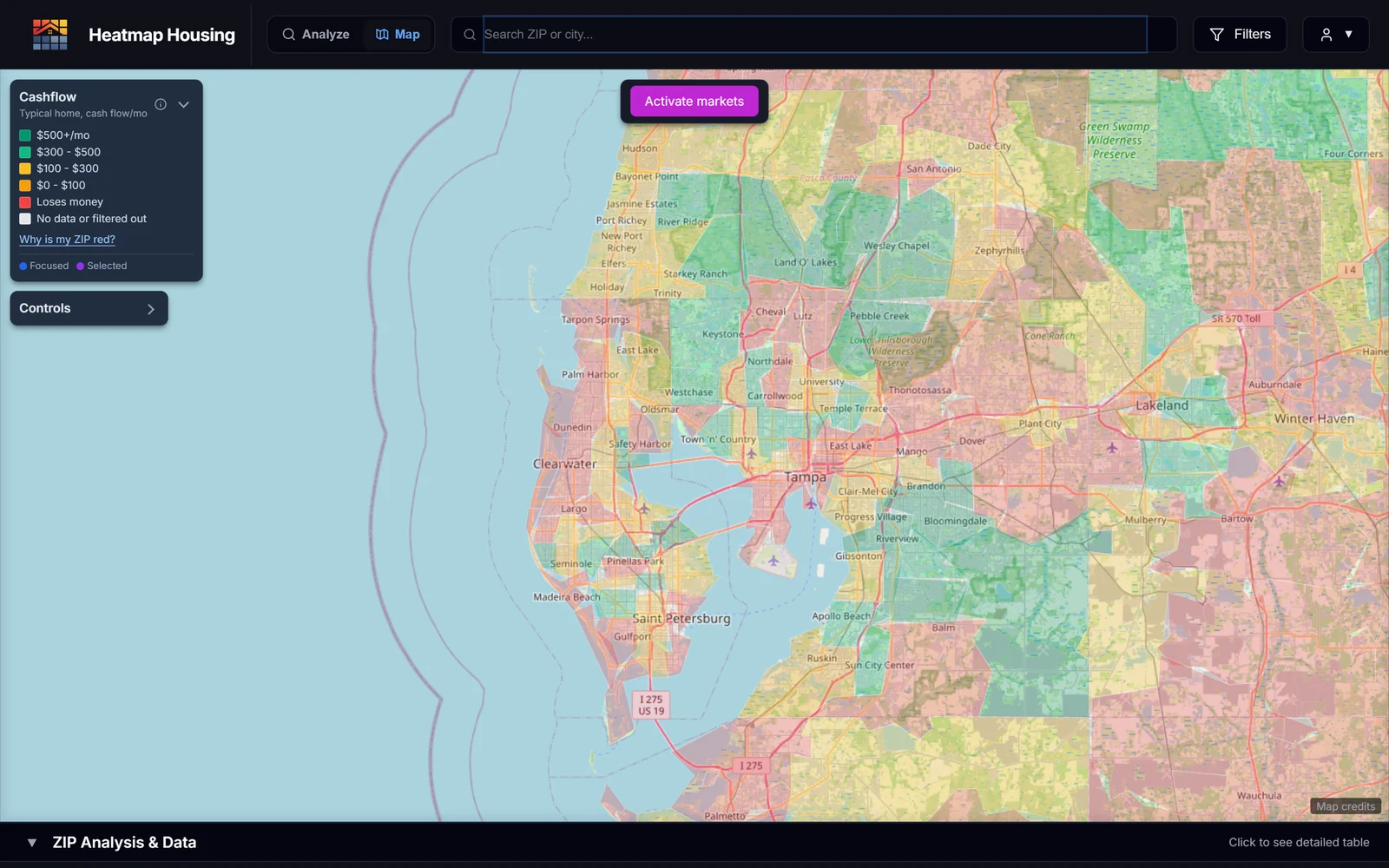
Every ZIP, colored by cash flow
Enter your budget and goal. More than 30,000 ZIPs are ranked and colored, and the table sorts them by cash flow, cap rate, or rent-to-price, so you know where rentals pencil out before you look at a house.
Free does not show listings. To check one house, buy a report. To see every listing in your markets, upgrade to Basic.
Your numbers on every listing in 5 markets.
Everything in Free, plus listings, the Deal Analyzer, and a deal pipeline.
-
 1
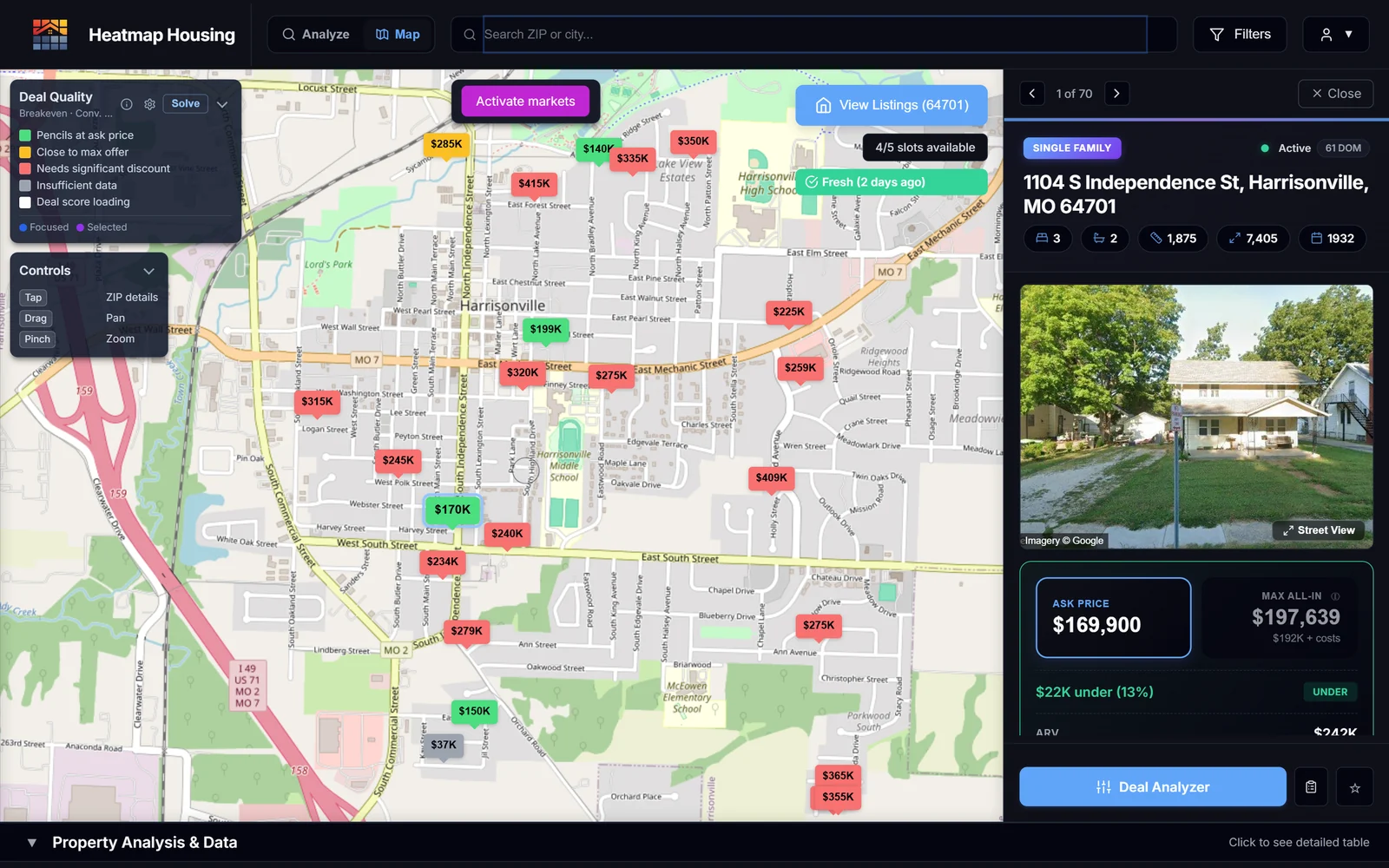
1Set your buy box once
Your down payment, rate, and the cash flow you want. Every listing in your 5 markets gets the same math. Green works at the asking price, yellow is close to your max offer, and red needs a big discount.
The ZIP solver preview shows how many listings in a ZIP work, and the top 3.
-
 2
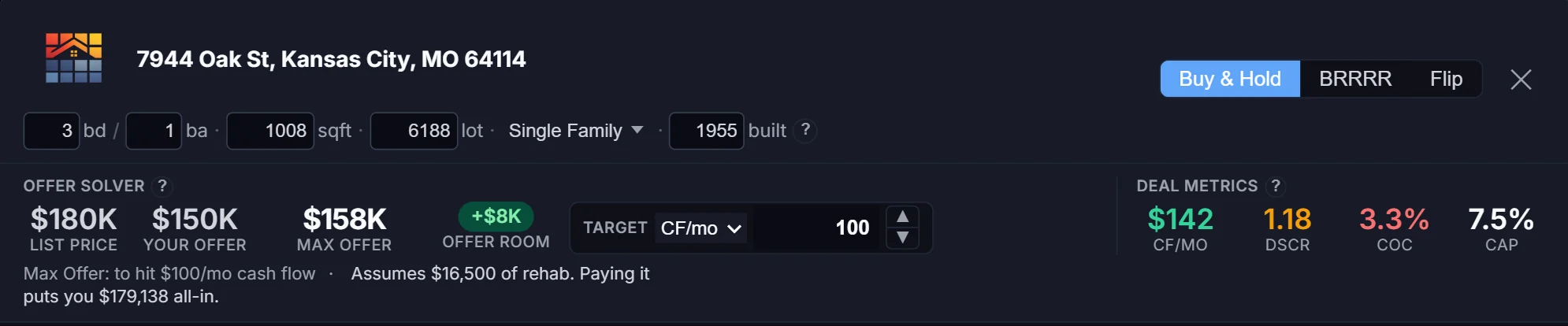
2Find the most you can pay
Open a listing in the Deal Analyzer. Rent, taxes, insurance, and value come filled in, each with its source and a confidence level. Change any number and it re-solves the max offer for your cash flow or DSCR target. On 7944 Oak St, listed at $180,000, that was $158,000 for $100 a month.
Switch to BRRRR or flip, or to HUD rent, without rebuilding the deal. 50 owner, tax, and sales-history lookups a month cover the listings you want to dig into.
-
 3
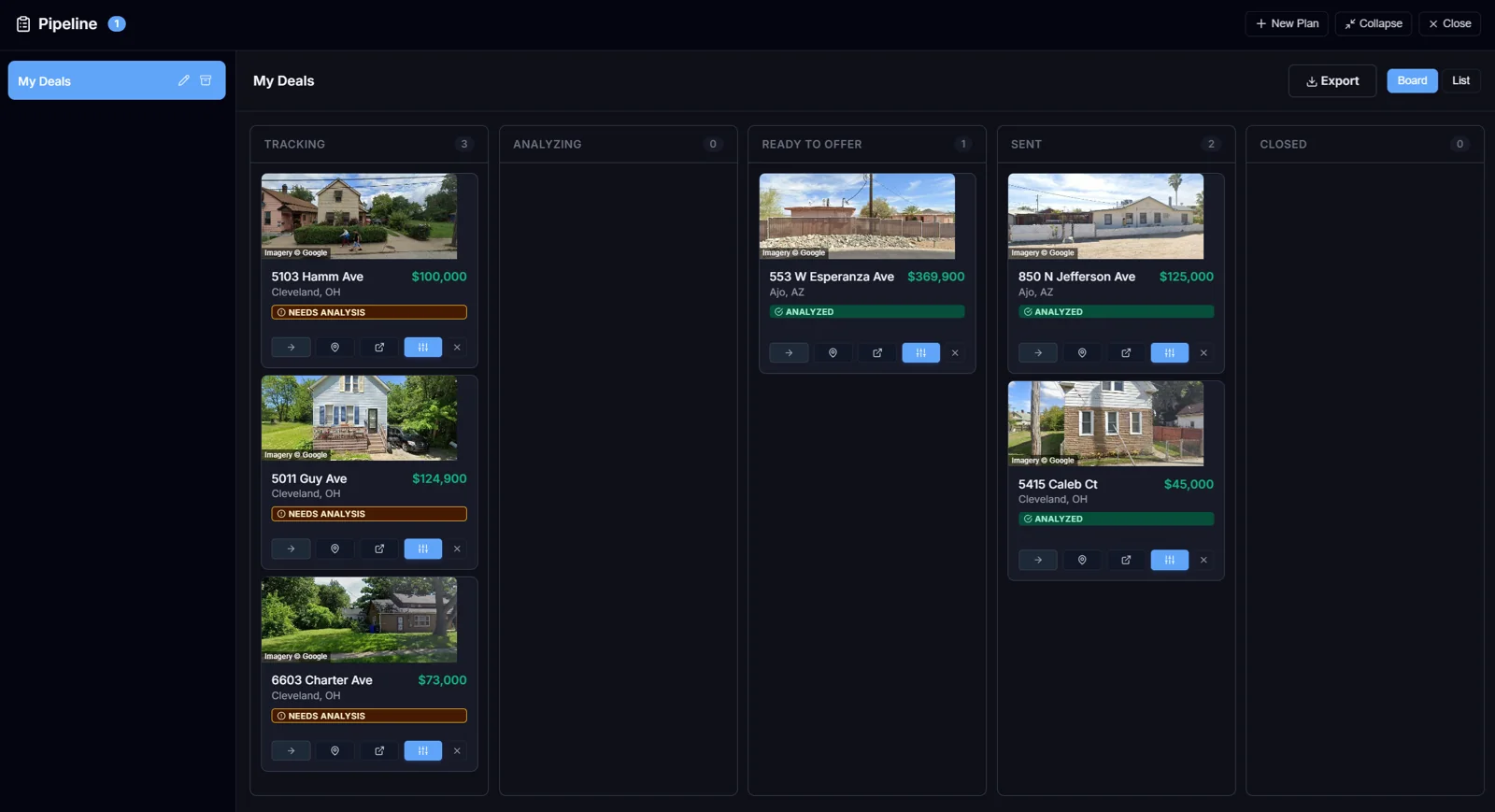
3Track the deals you are working
Save a deal and move it through Tracking, Analyzing, Ready to Offer, Offer Sent, and Closed. Each card keeps its numbers, so you can reopen the analysis at any point.
Export your saved deals as one PDF (a summary table plus a page per property) to share with your agent or lender.
Every listing in a ZIP, solved at once.
Everything in Basic, at the scale of a whole city.
-
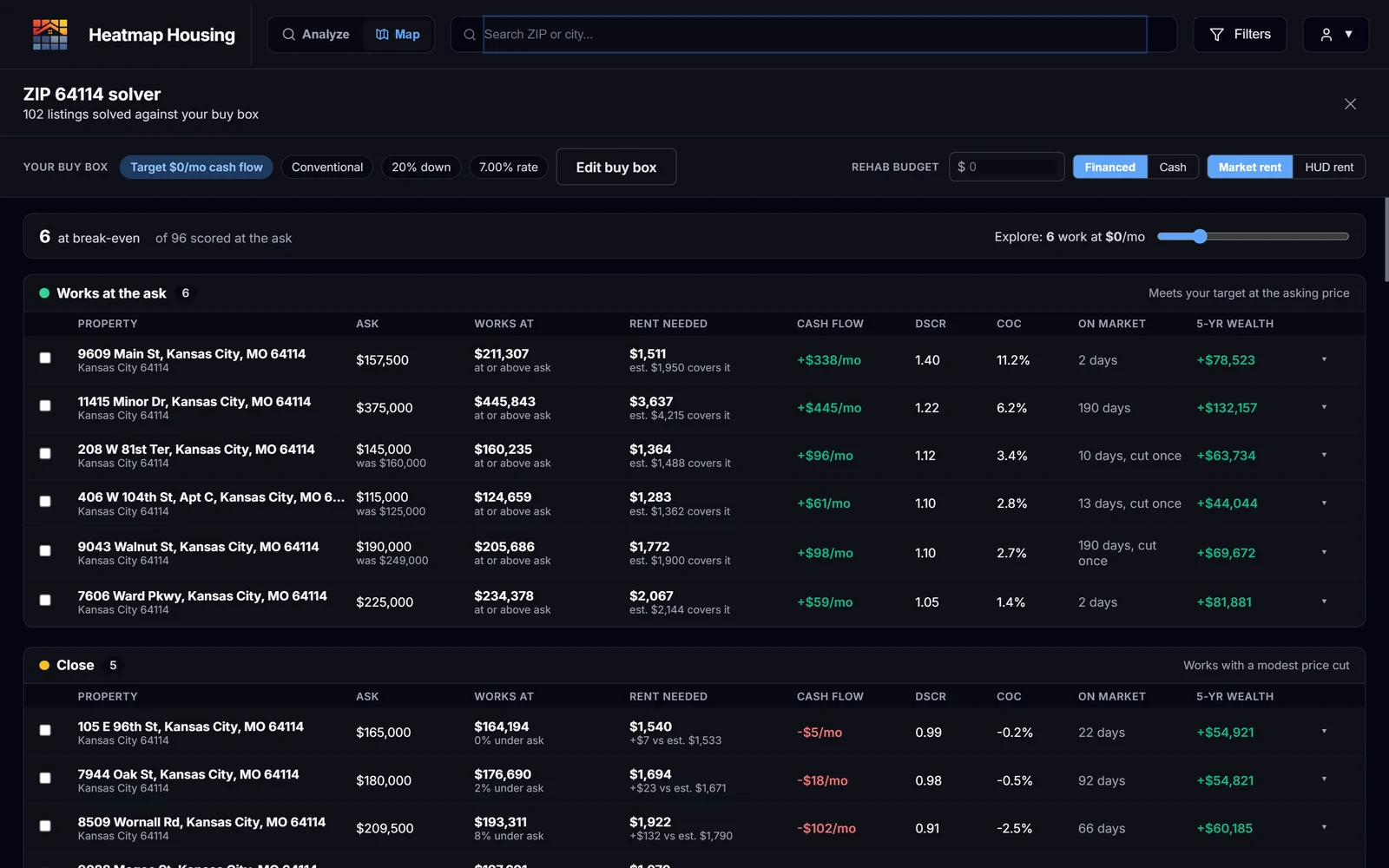
The full ZIP solver
Pick a ZIP and every listing is solved against your buy box: the price each one works at, the rent it would need, and the wealth it builds in five years. In 64114 that was 96 listings, 6 that work at the asking price, and 5 more with a modest price cut.
- 50 active markets, enough to cover a city
- Current-month data, and listings kept within 24 hours fresh
- 250 owner, tax, and sales-history lookups a month
- Unlimited workspaces and priority support
Check one house before you offer.
Search any address. No subscription needed.
-
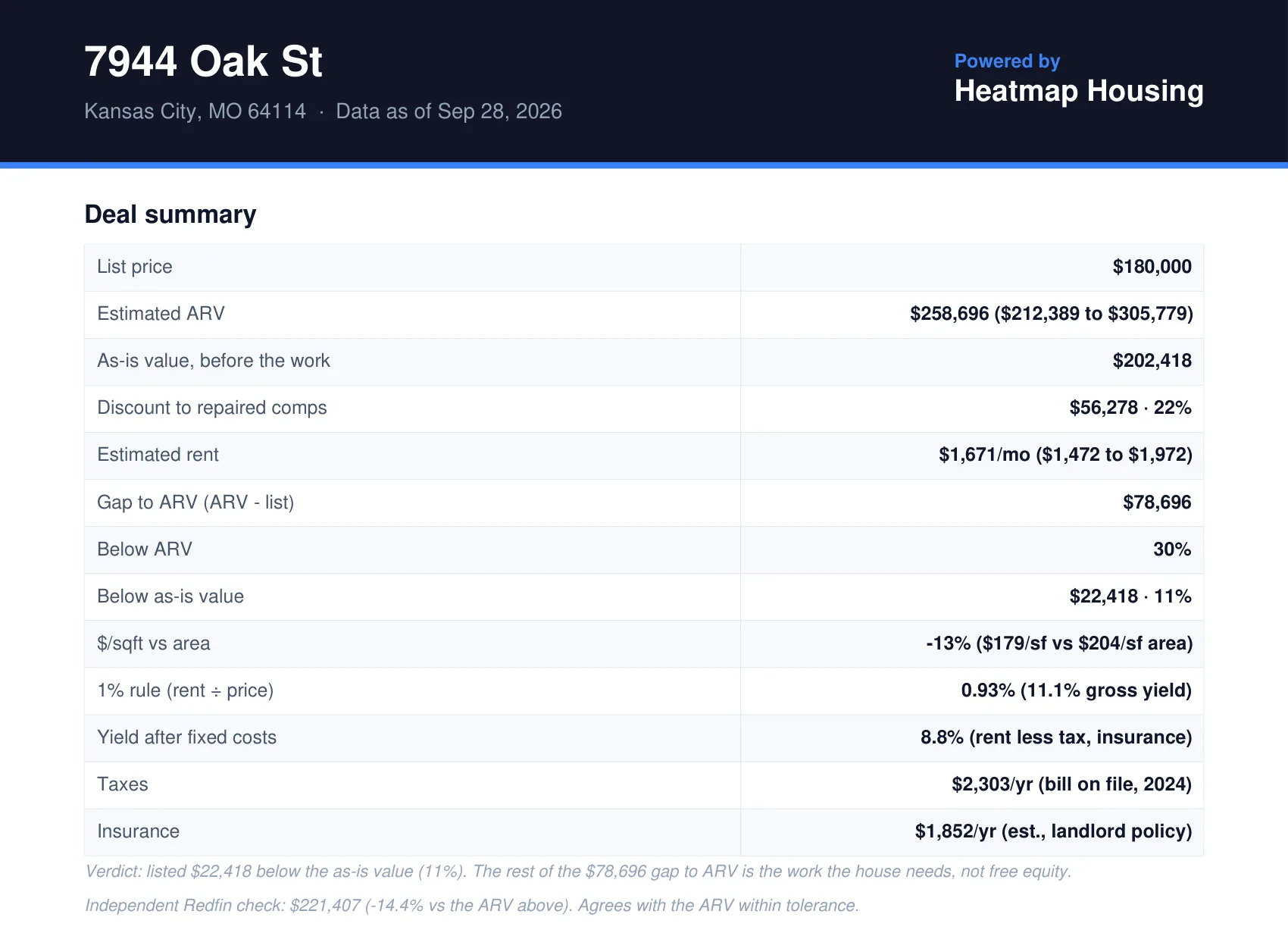
One house, checked in depth
Up to 25 nearby rentals, up to 25 nearby listings for the after-repair value, the owner record, taxes, insurance, and Census figures, with a rent and value estimate and the sources behind each. Download it as a dated PDF.
Reports use their own credits on every plan, separate from the monthly lookups in Basic and Pro. Credits last 12 months.
Example: 7944 Oak St, Kansas City, MO 64114
Listed at $180,000. Here is what the report came back with, and what it caught.
-
1
The neighborhood
64114 has strong incomes and thin rental margins. This house is priced well under the area, so the deal comes down to what you pay.
- This house
- $179/sqft
- ZIP median
- $204/sqft
- ZIP median rent
- $1,420/mo
- Sale-to-list
- 102%
-
2
Rent, from three signals
Two valuation models and 9 nearby rentals agree on about $1,670 a month.
Caught: HUD’s fair-market rent reads $2,070, 24% high. Underwrite on that number and the deal looks $400 a month better than it is. The report shows it and leaves it out.
- Automated valuation
- $1,650/mo
- Our model
- $1,619/mo
- 9 nearby rentals
- $1,723/mo
- HUD (excluded)
- $2,070/mo
- Rent used
- $1,671/mo
-
3
Value, before and after the work
The after-repair value comes from 20 nearby homes for sale or recently off the market, all within half a mile, checked against two models and a Redfin estimate.
Caught: the $78,696 gap to ARV is not free equity. As-is, the house is worth about $202,000, so most of that gap is the rehab you still have to pay for.
- List price
- $180,000
- As-is value
- $202,418
- Redfin check
- $221,407
- After repair (ARV)
- $258,696
-
4
The costs a listing leaves out
Taxes come from the county bill on file. Insurance is priced as a landlord policy, not a homeowner’s policy. The owner record shows an out-of-state LLC.
- Taxes (2024 bill)
- $2,303/yr
- Insurance (landlord)
- $1,852/yr
- Owner
- Absentee LLC
- Days on market
- 89
On Basic, the Deal Analyzer takes it from there: the most to pay for $100 a month, after $16,500 of rehab, is $158,000. See Basic.
Example data as of Sep 28, 2026. Estimates, not financial advice. Verify every figure before you offer.
Every number shows where it came from.
Rent is checked against three signals and value against four. Each value shows its source and a confidence level, so you can decide how much to trust it, override it, and move on.
- MLS-derived listing feeds
- Nearby rentals
- HUD Fair Market Rents (FMR and SAFMR)
- U.S. Census data
- County tax and ownership records
- Sales history
- Redfin market medians
BRRRR, with a verdict.
On Basic and Pro, the Deal Analyzer models the full buy, rehab, rent, refinance, repeat cycle and tells you which of four outcomes the deal lands in.
All your capital comes back and the property cash flows after refinance.
Cash left in deal ≤ $0 • Post-refi cash flow > $0
Some capital stays in the deal, but the property still cash flows after refinance.
Cash left in deal > $0 • Post-refi cash flow > $0
You get your capital back, but the refi payment kills cash flow.
Cash left in deal ≤ $0 • Post-refi cash flow ≤ $0
Capital trapped in the deal and no cash flow.
Cash left in deal > $0 • Post-refi cash flow ≤ $0
Underwrite the same house on market rent and HUD rent.
Market rent
What tenants pay on the open market, from nearby rentals and local data. This is the baseline for a conventional rental.
HUD SAFMR and FMR (reference baseline)
Published by the U.S. Department of Housing and Urban Development. SAFMR is set by ZIP and FMR by metro. Both are built in, so you can model a voucher scenario without rebuilding the deal.
Start with the free map.
See where rentals make money today. Upgrade when you find a market worth working.
Start freeQuestions first? Read the FAQ or compare plans.